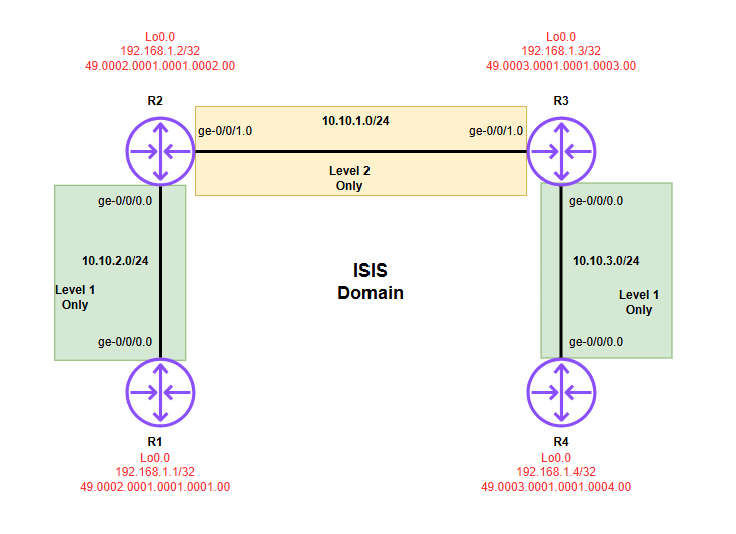
In this post, I will be introducing basic IS-IS configuration using the topology above. Before diving into the configuration section, I want to briefly introduce the mechanics of the protocol.
Intermediate System to Intermediate System (IS-IS) is a link-state routing protocol—conceptually similar to OSPF—originally developed by Digital Equipment Corporation. While OSPF was built specifically for the IP stack, IS-IS was designed for the OSI (Open Systems Interconnection) model. Because it is independent of the Network Layer, it is incredibly flexible, allowing it to route both IPv4 and IPv6 seamlessly using the same underlying infrastructure.
Important IS-IS Concepts
1. The OSI Address (NET)
Unlike OSPF, which uses Router IDs based on IP addresses, IS-IS uses a Network Entity Title (NET).
- Format: The NET is a hex address, usually 8 to 20 bytes long.
- Example:
49.0001.0001.0001.0001.00
Components:
- Authority and Area ID (49.0001): The first portion defines the authority and format identifier.
49is often used for private addressing (similar to RFC 1918), and0001defines the Area ID. - System ID (0001.0001.0001): This must be unique per router. A common trick is to use the router’s Loopback IP (e.g., 192.168.1.1) padded with zeros.
- N-Selector (00): For a router, this is always
00.
2. Levels vs. Areas
In OSPF, you have Area 0 (Backbone). In IS-IS, the hierarchy is defined by Levels:
| Level | Description |
|---|---|
| Level 1 (L1) | Intra-area routing (Station-to-Station). |
| Level 2 (L2) | Inter-area routing (The Backbone). |
| L1/L2 | A router that belongs to both, acting as a bridge between the local area and the backbone. |
Basic Juniper Configuration
To enable IS-IS on a Juniper device using the topology above, you must enable family iso on your interfaces and the loopback, then configure the protocol under the protocols hierarchy.
Interface Configurations
# R1 Interface Configuration
set interfaces ge-0/0/0 unit 0 family inet address 10.10.2.1/24
set interfaces ge-0/0/0 unit 0 family iso
set interfaces lo0 unit 0 family inet address 192.168.1.1/32
set interfaces lo0 unit 0 family iso address 49.0002.0001.0001.0001.00

# R2 Interface Configuration
set interfaces ge-0/0/0 unit 0 family inet address 10.10.2.2/24
set interfaces ge-0/0/0 unit 0 family iso
set interfaces ge-0/0/1 unit 0 family inet address 10.10.1.2/24
set interfaces ge-0/0/1 unit 0 family iso
set interfaces lo0 unit 0 family inet address 192.168.1.2/32
set interfaces lo0 unit 0 family iso address 49.0002.0001.0001.0002.00

# R3 Interface Configuration
set interfaces ge-0/0/0 unit 0 family inet address 10.10.3.3/24
set interfaces ge-0/0/0 unit 0 family iso
set interfaces ge-0/0/1 unit 0 family inet address 10.10.1.3/24
set interfaces ge-0/0/1 unit 0 family iso
set interfaces lo0 unit 0 family inet address 192.168.1.3/32
set interfaces lo0 unit 0 family iso address 49.0003.0001.0001.0003.00

# R4 Interface Configuration
set interfaces ge-0/0/0 unit 0 family inet address 10.10.3.4/24
set interfaces ge-0/0/0 unit 0 family iso
set interfaces lo0 unit 0 family inet address 192.168.1.4/32
set interfaces lo0 unit 0 family iso address 49.0003.0001.0001.0004.00
IS-IS Protocol Configurations
# Enabling ISIS on interfaces on R1
set protocols isis interface ge-0/0/0.0 level 2 disable #enables only Level 1
set protocols isis interface lo0.0

# Enabling ISIS on interfaces on R2
set protocols isis interface ge-0/0/0.0 level 2 disable #enables only Level 1
set protocols isis interface ge-0/0/1.0 level 1 disable #enables only Level 2
set protocols isis interface lo0.0

# Enabling ISIS on interfaces on R3
set protocols isis interface ge-0/0/0.0 level 2 disable
set protocols isis interface ge-0/0/1.0 level 1 disable
set protocols isis interface lo0.0

# Enabling ISIS on interfaces on R4
set protocols isis interface ge-0/0/0.0 level 2 disable
set protocols isis interface lo0.0
Protocol Verifications
# show isis interface
root@R2# run show isis interface
IS-IS interface database:
Interface             L CirID Level 1 DR        Level 2 DR        L1/L2 Metric
ge-0/0/0.0            1   0x2 R2.02             Disabled               10/10
ge-0/0/1.0            2   0x1 Disabled          R3.02                  10/10
lo0.0                 3   0x1 Passive           Passive                 0/0


# show isis adjacency
root@R1# run show isis adjacency
Interface             System         L State        Hold (secs) SNPA
ge-0/0/0.0            R2             1  Up                    6  0:5:86:71:77:0

# show isis database brief
root@R1# run show isis database brief
IS-IS level 1 link-state database:
LSP ID                      Sequence Checksum Lifetime Attributes
R1.00-00                         0xe   0xb535     1004 L1 L2
R2.00-00                         0xe   0x37a4      935 L1 L2 Attached
R2.02-00                         0xb   0xe1b3     1135 L1 L2
  3 LSPs

IS-IS level 2 link-state database:
LSP ID                      Sequence Checksum Lifetime Attributes
R1.00-00                         0xe   0x1a95     1173 L1 L2
  1 LSPs

# show isis adjacency R2 extensive
root@R1# run show isis adjacency R2 extensive
R2
  Interface: ge-0/0/0.0, Level: 1, State: Up, Expires in 8 secs
  Priority: 64, Up/Down transitions: 1, Last transition: 01:13:26 ago
  Circuit type: 1, Speaks: IP, IPv6, MAC address: 0:5:86:71:77:0
  Topologies: Unicast
  Restart capable: Yes, Adjacency advertisement: Advertise
  LAN id: R2.02, IP addresses: 10.10.2.2
  Transition log:
  When                  State        Event           Down reason
  Sun Mar 22 17:00:00   Up           Seenself


#Other verification command to execute
1. show isis database detail
2. show route protocol isis